> ## Documentation Index
> Fetch the complete documentation index at: https://docs.hyperlane.xyz/llms.txt
> Use this file to discover all available pages before exploring further.
# HWRs Overview
Hyperlane Warp Routes (HWR) are modular cross-chain asset bridges that enable the transfer of tokens between chains using Hyperlane. Developers can use Hyperlane to permissionlessly deploy HWRs to move assets between chains.
They support various asset types, including:
* ERC20 & ERC721 tokens (for EVM-compatible chains)
* SVM-based assets (for SVM-compatible chains)
* Native tokens (such as ETH, or other gas tokens)
You can combine HWR with a Hyperlane deployment to create economic routes between any chain and others already connected through Hyperlane.
## Modular Security
Like all applications built on top of Hyperlane, HWRs have customizable security via [Interchain Security Modules](../../protocol/ISM/modular-security).
The deployer of a HWR can specify the ISMs that are used to verify interchain transfer messages. This means that each HWR may have a unique security configuration. Users transferring interchain tokens should understand the trust assumptions of a Route before using it.
Similarly, Warp frontends should manually curate their HWR to avoid supporting
insecure ones. See the [Warp UI deployment
docs](/docs/guides/warp-routes/bridge-ui-guide) details.
## HWR Architecture
HWR let deployers choose how tokens are transferred between chains. Depending on the type of HWR, contracts will lock tokens, mint wrapped tokens, burn wrapped tokens, or release original tokens.
For example:
1. **Collateral → Synthetic**: Tokens are locked on the origin (collateral) chain, a message is sent, and wrapped tokens are minted on the destination (synthetic) chain.
2. **Native → Synthetic**: Native gas tokens (e.g., ETH) are locked on the origin chain, a message is sent, and synthetic tokens are minted on the destination chain.
3. **Native → Collateral**: Native tokens are locked on the origin chain, a message is sent, and collateral tokens are released on the destination chain.
Each HWR requires a contract deployed on every chain its on that acts as an entry/exists point. These contracts use the [Mailbox](/docs/protocol/core/mailbox) to send interchain messages to one another.
### HWR Types
This table gives a high-level overview of HWR types. For detailed explanations, see: [HWR Types.](./types)
| **HWR Type** | **Description** |
| ------------------------- | ------------------------------------------------------------------------------------------------ |
| Native Token HWRs | Enables direct transfers of native gas tokens (e.g., ETH) across chains without wrapping. |
| Collateral-Backed ERC20 | Locks ERC20 tokens as collateral on the source chain for cross-chain transfers. |
| Synthetic ERC20 | Mints new ERC20 tokens on the destination chain to represent the original tokens. |
| Hyperlane Warp Routes 2.0 | Allows liquidity to be sourced from multiple collateral tokens. |
| Specialized HWR | Adds advanced features or integrates with specific use cases (e.g., vaults, fiat-backed tokens.) |
### Example Architecture
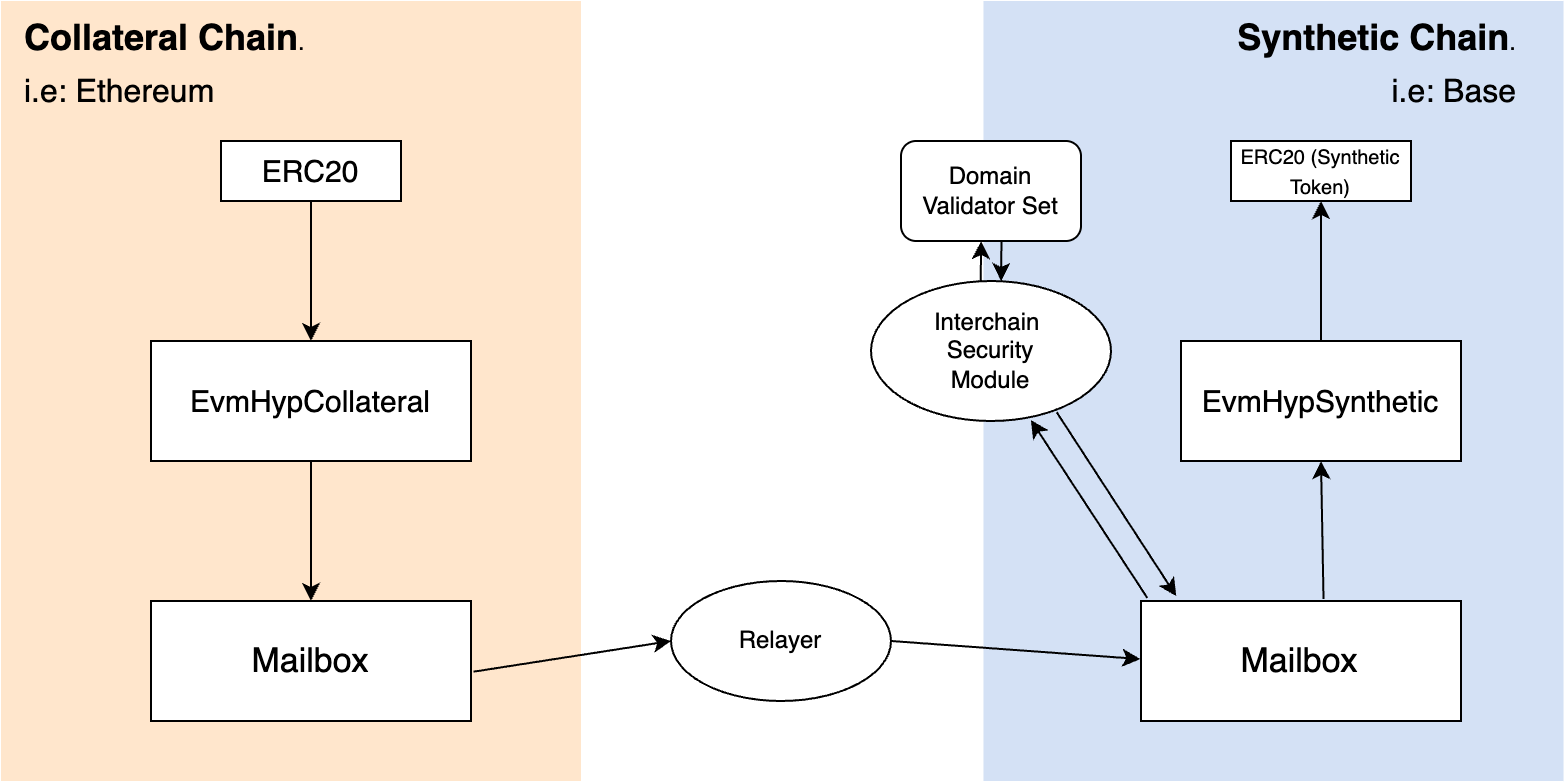
Let’s walk through a **Collateral** to **Synthetic** HWR using the lock-and-mint model to transfer ERC20 tokens between two chains:
1. The user locks their tokens on the collateral chain (e.g., Ethereum) in the HWR contract.
2. A message is sent through Hyperlane’s Mailbox and relayed to the synthetic chain (e.g., Base).
3. On the destination chain, the HWR contract mints wrapped tokens to the user.
In the diagram below, the ISM is a [Multisig ISM](/docs/protocol/ISM/standard-ISMs/multisig-ISM), which uses a set of validators to approve messages. (Note: Not all ISMs require validators, this depends on the chosen security model.)
Here’s a simplified view of the flow:
 ## Deploy a HWR
HWR can be deployed between any set of chains that have Hyperlane deployments.
To deploy a HWR, head over to the following guides:
* [EVM-based HWR](/docs/guides/quickstart/deploy-warp-route)
* [SVM-based HWR](/docs/guides/warp-routes/svm/svm-warp-route-guide)
* [EVM-SVM HWR](/docs/guides/warp-routes/evm-svm-warp-route-guide)
If you would like to create a HWR that includes a chain that Hyperlane is not
currently deployed on, feel free to [deploy
Hyperlane](/docs/guides/chains/deploy-hyperlane) yourself!
## Deploy a HWR
HWR can be deployed between any set of chains that have Hyperlane deployments.
To deploy a HWR, head over to the following guides:
* [EVM-based HWR](/docs/guides/quickstart/deploy-warp-route)
* [SVM-based HWR](/docs/guides/warp-routes/svm/svm-warp-route-guide)
* [EVM-SVM HWR](/docs/guides/warp-routes/evm-svm-warp-route-guide)
If you would like to create a HWR that includes a chain that Hyperlane is not
currently deployed on, feel free to [deploy
Hyperlane](/docs/guides/chains/deploy-hyperlane) yourself!